


Stripe Dashboard
4.23.27K Reviews
App Specs
- Version
- 2.92.0
- Updated On
- License
- Free
- Downloads
- 1,000,000+
- Developer
- Stripe, LLC
- Categories
- Business
- Platform
- Android, iOS
Screenshots
 Analysis by AppCompare
I would not treat a shared phone as a shared Stripe account. If a small household business relies on Stripe, the app can make it easier for the person on duty to check payment activity without sitting at a computer. But financial information belongs behind clear account boundaries: the person who owns or manages the business should decide who can access it, and nobody should pass around a personal sign-in just because the phone is nearby.
A useful check-in, not a family finance app
In a realistic day-to-day routine, imagine a maker selling at a weekend market while another person helps pack orders at home. The owner can use the mobile dashboard to keep an eye on incoming payments, then share only the practical information the helper needs, such as whether an order was paid. That is a more sensible workflow than handing over the phone so someone can browse customer or payment details.
This distinction matters because Stripe Dashboard is a business tool, not a household budgeting app. It is most useful when the people using it are already involved in a business that accepts payments through Stripe. If your goal is to split grocery costs, track personal spending, or manage a family allowance, a dedicated household finance app is a better fit.
Set access deliberately before relying on mobile checks
I would begin by deciding who should be able to sign in and what each person actually needs to do. A business owner may want to monitor activity while away, whereas a helper may need no direct access at all. Keeping those roles separate reduces the chance that a casual look at the dashboard turns into an accidental change or an unnecessary exposure of customer information.
That boundary is especially useful with a shared device. Before letting another person use the phone, close the business app or otherwise make sure the account is not left open for the next person. Avoid leaving payment details visible on a table or passing the phone around during a busy shift. These are ordinary habits, but they matter more when a device moves between work and personal use.
For a team, I would make account access part of the setup conversation rather than an improvised fix when someone needs to check a payment. Use the access arrangements available to the business, and give people only the access appropriate to their responsibilities. The app’s convenience should not replace a considered decision about who is trusted with business records.
Coordinate around the information, not the login
The strongest shared-use pattern is for one authorized person to monitor the dashboard and communicate the relevant outcome to others. For example, the person handling a stall can check whether a payment came through, while the person preparing an order follows the agreed process for packing it. This avoids making every helper a user of the financial account and keeps the task moving without turning the phone into a communal control panel.
Worth Reading Before You Choose

EA SPORTS FC Mobile 26 Is a Bigger Football Game, but It Takes Time

Flipboard Shows What News Apps Must Do Beyond the Feed

Switching to Android Auto Means Rethinking Your Driving Routine

Google Calendar Makes a Crowded Week Easier to Manage

Ludo King Makes the Most of the Minutes Between Plans

Baby Panda World Brings Quick Play to Modern Phones, but Its Game Library Feels Busy
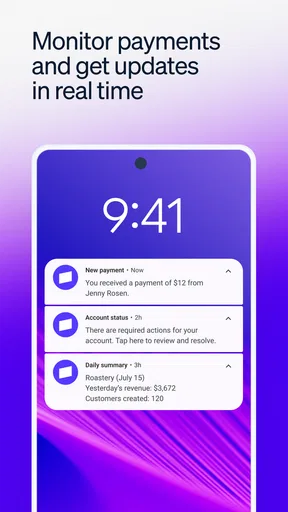
Notifications can help an owner notice activity without repeatedly opening the app, but they are not a substitute for checking the underlying transaction when a decision has consequences. A notification may be useful as a prompt; for a disputed order or a customer question, I would open the relevant record and verify the details before responding. That small pause is a practical safeguard against acting on a quick glance alone.
It also helps to agree on what counts as confirmation. A helper should know whether the owner’s message, a receipt, or another business process is the signal to proceed. The dashboard supports oversight, but it cannot decide how a household business divides duties or resolves misunderstandings. A clear routine does that better than a shared password.
Age, trust, and customer privacy
The app is rated for Everyone, but that does not mean every child or household member should use a business account. The age label describes the app’s content context; it is not a recommendation to give minors access to payment records. I would keep account use with an adult or an appropriately authorized business operator, and explain to helpers that customer details are private even when they appear on a phone screen.
Trust also means resisting the temptation to use a familiar device as a shortcut around proper access. A spouse, relative, or friend may be reliable in everyday life and still not need to see transaction histories or customer information. If someone’s role changes, review whether their access remains appropriate rather than assuming that old arrangements should continue indefinitely.
For a one-person business, this can be simple: keep the account under the owner’s control and use the phone for quick checks. For a business with several people handling orders, support, or finances, decide who monitors payments and who handles customer conversations. That separation makes it easier to answer questions consistently and limits unnecessary access to sensitive records.
When I first stumbled upon the Stripe Dashboard, I was pretty curious. As someone who’s always on the lookout for efficient ways to manage financial transactions, I figured I’d give it a whirl. So, I downloaded it onto my device and dove right in to see what this app is all about.
First Impressions and User Interface
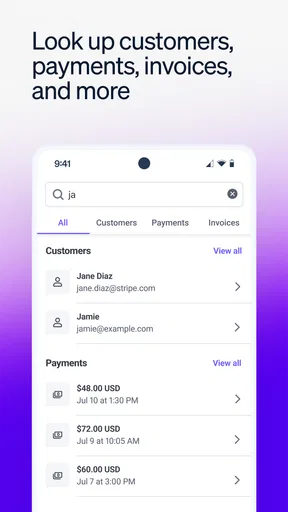
Upon opening the app, the first thing I noticed was the clean and intuitive interface. It’s designed to make navigation a breeze, which is a massive plus if you're like me and prefer not to spend ages figuring out where everything is. The dashboard is sleek, with all the essential tools laid out in a way that just makes sense.
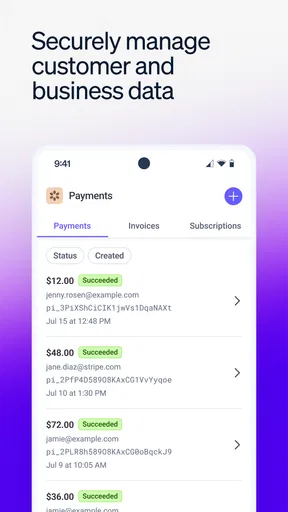
The color palette is easy on the eyes, primarily featuring blues and whites. This might sound trivial, but when you’re managing finances, a soothing interface can make the process much more pleasant. Everything from transaction histories to balance overviews is accessible with just a few taps.
Features That Stand Out
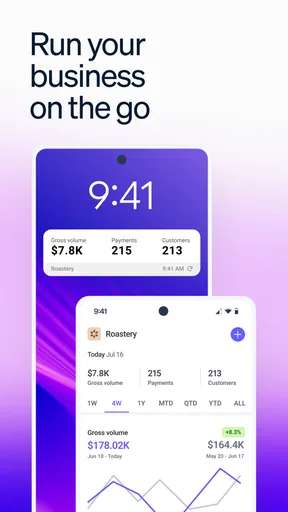
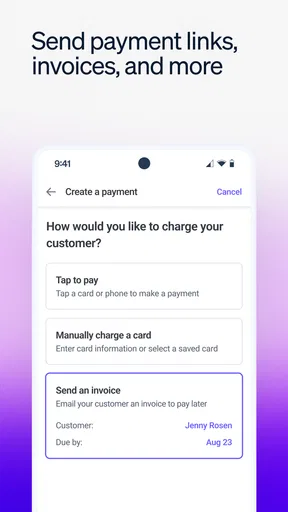
What really caught my attention is how Stripe Dashboard allows you to manage your payments and business right from your phone. Whether you’re on the go or just lounging on your couch, you can easily check on your transactions. Here are a few features that I found particularly useful:
- Real-time Updates: You get instant notifications of any transaction. This real-time insight is crucial for businesses that need to keep a constant eye on their cash flow.
- Customer Insights: The app provides detailed customer information and history, which can be a game-changer for strategizing your business moves.
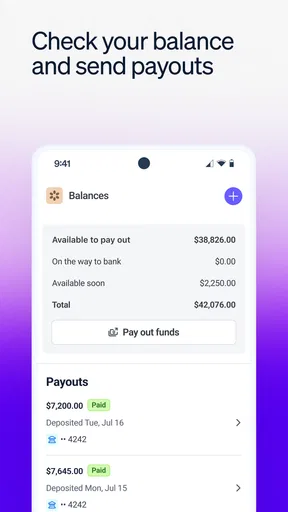
- Quick Transfers: Need to transfer funds? The app makes it as simple as a couple of taps, ensuring you’re not spending more time than necessary on routine tasks.
Performance and Reliability
One of the most critical aspects of any financial app is its reliability. No one wants to deal with an app that crashes mid-transaction. During my time using the app, I found it to be incredibly stable. It loads quickly and performs tasks without lag, which is pretty crucial when dealing with financial data.
The app is also secured with top-notch encryption, so you can rest easy knowing your financial information is safe. This peace of mind is invaluable when dealing with sensitive data.
Is It Worth It?
So, is the Stripe Dashboard worth downloading? In my opinion, absolutely. It’s a robust tool for anyone needing to manage their financial transactions efficiently. Whether you’re a small business owner or just someone who likes having their financial affairs in order, this app has something to offer.
It’s not just about keeping track of numbers. The app gives you the power to understand your business better and make informed decisions. Plus, the convenience of having all this information at your fingertips is hard to beat.
Stripe Dashboard is a free business app from Stripe, LLC, with an average rating of 4.4 from around 33,000 ratings and more than 1 million installs. It is rated for Everyone, and version 2.88.1 requires Android 8.0 or later. The rating and broad adoption suggest many people find it useful, though they cannot tell you whether it fits your particular checkout workflow. I would treat it as a companion to a Stripe-based business, not as a replacement for deciding how that business handles payments.
Where mobile access earns its place
The phone version is most compelling when a question needs an answer while you are away from your usual workstation. If a customer says they paid, a seller can check the transaction rather than guessing. If a business owner is between appointments, a quick look at activity can help them decide whether a follow-up is needed. Those small moments are where mobile access can save friction; it is less convincing as the place to do every detailed administrative task.
A useful habit is to separate monitoring from decision-making. A payment notification can tell you to look, but for a refund, a customer dispute, or a change to an order, take time to inspect the relevant record and confirm the business context. A phone is excellent for timely awareness, yet its compact screen makes it easier to skim past details. I would not make a consequential call based only on a notification preview.
For a business with an online store, the app can also serve as a quick operational check while the fuller workflow remains on a computer. For example, an owner can notice a change in payment activity during a commute, then review the broader picture later before adjusting inventory or staffing. That split keeps the app useful without expecting a mobile dashboard to replace careful bookkeeping or longer-form analysis.
How it compares with other ways to manage payments
Compared with signing in through a desktop browser, the main advantage here is immediacy: the business owner can check activity wherever they are, rather than waiting until they return to a computer. A browser can still be more comfortable for extended review, especially when you need to compare multiple records or work through a complicated issue. I see the app as the fast-access option and a larger screen as the better setting for tasks that demand concentration.
Compared with a general payment or banking app, Stripe Dashboard is tied to business activity managed through Stripe. That focus is useful if your business already uses Stripe and you want to keep an eye on its payment operations in one place. It is not a universal control center for every payment provider, nor does it replace a bank’s tools for viewing personal finances. If your business depends on another processor, its own dashboard may be more practical because it reflects the transactions you actually handle there.
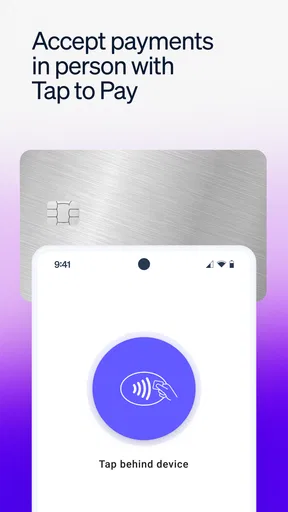
There is also a difference between an account dashboard and a point-of-sale setup. This app is for reviewing and managing business information from a phone; a seller choosing equipment or a complete in-person checkout process should evaluate the full payment setup they need, rather than assuming a dashboard alone covers every part of taking payment. I would choose based on the whole workflow: how customers pay, who reconciles transactions, and where records are reviewed.
Who will appreciate it, and who may not
I would recommend it to independent sellers, small business owners, and people who already use Stripe and occasionally need to check payment activity away from a desk. It is particularly handy for owners who handle several roles themselves and want a quick view of what is happening before they return to more detailed work. The free price makes trying the app less of a commitment, although a business should still consider the costs and terms of its broader payment arrangement separately.
I would skip it if you do not use Stripe for business payments, if you only want to track household spending, or if you expect a mobile app to replace a full accounting process. It is also not the best choice for someone who prefers to keep all business administration on a computer and has no need for on-the-go checks. In those cases, a bank app, a bookkeeping tool, or the dashboard for the payment provider you already use may be the more direct option.
Before relying on it during a busy period, I would install it, sign in through the proper business account, and practice finding the information you expect to need. Knowing where to check a payment before a customer is waiting is a small preparation that can make the mobile workflow feel much less hurried. Keep the phone secured as you normally would, and avoid treating a visible balance or an alert as a substitute for reviewing the transaction details that matter.
What to expect from the business workflow
The app’s value depends on the quality of the process around it. A notification is useful only if someone knows who will respond; customer history helps only if the team uses it to give consistent service; and a transfer shortcut is helpful only when the person initiating it understands the business’s cash needs. I would set a simple routine: decide who checks activity, when unusual transactions are escalated, and where the business keeps its fuller records.
One non-obvious trade-off is that faster access can encourage too many reactive checks. Constantly refreshing a dashboard can distract from serving customers, while a sensible notification routine lets the owner reserve attention for activity that needs a response. Another is privacy: customer details can make support more informed, but should not be browsed without a business reason. Convenience is strongest when paired with restraint.
For practical questions such as whether the app is free, it is: Stripe Dashboard is listed as free to download. That does not mean every service connected to accepting payments is free, so I would distinguish the app’s price from the terms of a payment-processing arrangement. Likewise, the Everyone age rating is about the app’s content classification, not a reason to let a child handle business transactions.
In conclusion, the Stripe Dashboard app is a must-have for those looking to streamline their financial processes. It’s efficient, user-friendly, and packed with features that cater to both novice and experienced users. If you haven’t checked it out yet, I’d say it’s high time you do. You might find it becomes an indispensable part of your financial toolkit.
Pros
- Intuitive interface for easy navigation.
- Real-time updates on transactions.
- Customizable reports for detailed insights.
- Secure data handling and encryption.
- Seamless integration with other Stripe tools.
Cons
- Requires a stable internet connection.
- Limited offline functionality.
- Advanced features may overwhelm beginners.
- Mobile app lacks some desktop features.
- Occasional lag with high data volume.
FAQs for Stripe Dashboard
What features does the Stripe Dashboard offer?
The Stripe Dashboard provides a comprehensive suite of tools for managing payments, subscriptions, and financial reporting. Users can view real-time transaction data, manage customer information, issue refunds, and generate detailed financial reports. Additionally, it offers advanced analytics and insights to help businesses optimize their payment processes.
Is the Stripe Dashboard secure for handling transactions?
Yes, the Stripe Dashboard is designed with security as a top priority. It employs robust encryption protocols to protect sensitive data, ensuring secure transaction processing. Stripe is PCI DSS compliant, which means it adheres to industry standards for handling credit card information, providing peace of mind for both businesses and customers.
Can I integrate the Stripe Dashboard with other applications?
Absolutely. The Stripe Dashboard offers seamless integration with a variety of third-party applications and platforms, including accounting software, e-commerce platforms, and more. This flexibility allows businesses to streamline operations and manage financial activities efficiently without needing to switch between different systems.
Is there a mobile version of the Stripe Dashboard available?
Yes, Stripe offers a mobile app version of the Dashboard for both Android and iOS devices. This app provides all the essential features of the desktop version, allowing users to manage transactions, view analytics, and respond to customer inquiries on the go, ensuring businesses can operate efficiently from anywhere.
What kind of customer support does Stripe provide for Dashboard users?
Stripe offers robust customer support for Dashboard users, including extensive online documentation, community forums, and direct support channels. Businesses can access 24/7 email and chat support, ensuring help is available whenever needed. Additionally, Stripe provides a wealth of resources to help users maximize the Dashboard's potential.


